Description
Hardware compatibility
Compatible with the: HP Elite x2 1012 G1, x2 1011; HP EliteBook Folio 1020, Folio 1040.


Hardware compatibility
| Hardware compatibility | Compatible with the: HP Elite x2 1012 G1, x2 1011; HP EliteBook Folio 1020, Folio 1040. |
|---|---|
| Power | 5 Volts/3 Amps |
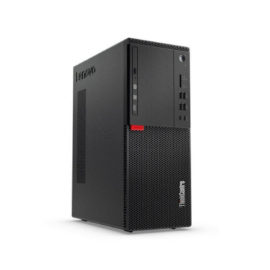
 Extremley powerful, easy to manage, and configurable,ThinkCentre M710 Tower can be tailored to meet your computing needs today–and tomorrow. Boasting the latest performance and storage technology, this tower is super fast, responsive, and efficient. As well as being able to empower you and your business, it comes with robust security features to safeguard your critical data and the built-in reliability your organization can count on.
Extremley powerful, easy to manage, and configurable,ThinkCentre M710 Tower can be tailored to meet your computing needs today–and tomorrow. Boasting the latest performance and storage technology, this tower is super fast, responsive, and efficient. As well as being able to empower you and your business, it comes with robust security features to safeguard your critical data and the built-in reliability your organization can count on.
Extremley powerful, easy to manage, and configurable,ThinkCentre M710 Tower can be tailored to meet your computing needs today–and tomorrow. Boasting the latest performance and storage technology, this tower is super fast, responsive, and efficient. As well as being able to empower you and your business, it comes with robust security features to safeguard your critical data and the built-in reliability your organization can count on. 

KEY FEATURES
KEY FEATURES
 Versatile and dependable, Seagate’s fierce new BarraCuda drives are inspired by the past but ready for the future. BarraCuda drives are a cost-effective way to handle all your PC needs—working, playing storing your movies and music, and more.
The ThinkPad Thunderbolt 3 WorkStation Dock is a pioneering docking solution powered by Intel Thunderbolt technology.
The ThinkPad Thunderbolt 3 WorkStation Dock is a pioneering docking solution powered by Intel Thunderbolt technology.
ThinkPad Docking Stations provide the best docking experience for large enterprise ThinkPad customers.
ThinkPad Docking Stations provide the best docking experience for large enterprise ThinkPad customers.
The ThinkPad USB 3.0 Ultra Dock (40A8) is an universal USB docking solution that not only delivers a premium display experience (up to 4k2k resolution via DisplayPort), but also provides quick and easy connection to all the workspace peripherals you use every day. Simply plug in a single USB 3.0 cable into your Lenovo PC for instant access to up to two external monitors, USB ports, Gigabit Ethernet, headphones/speakers, USB printers, scanners, keyboard, mouse and so on for daily use. The Dock can also charge your mobile devices via two USB always power on ports.
The ThinkPad USB 3.0 Ultra Dock (40A8) is an universal USB docking solution that not only delivers a premium display experience (up to 4k2k resolution via DisplayPort), but also provides quick and easy connection to all the workspace peripherals you use every day. Simply plug in a single USB 3.0 cable into your Lenovo PC for instant access to up to two external monitors, USB ports, Gigabit Ethernet, headphones/speakers, USB printers, scanners, keyboard, mouse and so on for daily use. The Dock can also charge your mobile devices via two USB always power on ports.
The ThinkPad Thunderbolt 3 Dock (40AC) is a pioneering, 13 port docking solution powered by Intel Thunderbolt™ technology. Now, you can connect and rapidly charge like never before via a USB Type-C TM port all while experiencing complete control of your workstation and essential accessories.
The ThinkPad Thunderbolt 3 Dock (40AC) is a pioneering, 13 port docking solution powered by Intel Thunderbolt™ technology. Now, you can connect and rapidly charge like never before via a USB Type-C TM port all while experiencing complete control of your workstation and essential accessories.
Versatile and dependable, Seagate’s fierce new BarraCuda drives are inspired by the past but ready for the future. BarraCuda drives are a cost-effective way to handle all your PC needs—working, playing storing your movies and music, and more.
Versatile and dependable, Seagate’s fierce new BarraCuda drives are inspired by the past but ready for the future. BarraCuda drives are a cost-effective way to handle all your PC needs—working, playing storing your movies and music, and more.
The ThinkPad Thunderbolt 3 WorkStation Dock is a pioneering docking solution powered by Intel Thunderbolt technology.
The ThinkPad Thunderbolt 3 WorkStation Dock is a pioneering docking solution powered by Intel Thunderbolt technology.
ThinkPad Docking Stations provide the best docking experience for large enterprise ThinkPad customers.
ThinkPad Docking Stations provide the best docking experience for large enterprise ThinkPad customers.
The ThinkPad USB 3.0 Ultra Dock (40A8) is an universal USB docking solution that not only delivers a premium display experience (up to 4k2k resolution via DisplayPort), but also provides quick and easy connection to all the workspace peripherals you use every day. Simply plug in a single USB 3.0 cable into your Lenovo PC for instant access to up to two external monitors, USB ports, Gigabit Ethernet, headphones/speakers, USB printers, scanners, keyboard, mouse and so on for daily use. The Dock can also charge your mobile devices via two USB always power on ports.
The ThinkPad USB 3.0 Ultra Dock (40A8) is an universal USB docking solution that not only delivers a premium display experience (up to 4k2k resolution via DisplayPort), but also provides quick and easy connection to all the workspace peripherals you use every day. Simply plug in a single USB 3.0 cable into your Lenovo PC for instant access to up to two external monitors, USB ports, Gigabit Ethernet, headphones/speakers, USB printers, scanners, keyboard, mouse and so on for daily use. The Dock can also charge your mobile devices via two USB always power on ports.
The ThinkPad Thunderbolt 3 Dock (40AC) is a pioneering, 13 port docking solution powered by Intel Thunderbolt™ technology. Now, you can connect and rapidly charge like never before via a USB Type-C TM port all while experiencing complete control of your workstation and essential accessories.
The ThinkPad Thunderbolt 3 Dock (40AC) is a pioneering, 13 port docking solution powered by Intel Thunderbolt™ technology. Now, you can connect and rapidly charge like never before via a USB Type-C TM port all while experiencing complete control of your workstation and essential accessories.  Keep up to six of your most frequently-used USB devices like external storage, keyboard, mouse or optical drive plugged into the replicator so they’re ready to use at a moment’s notice. The included power cord keeps the replicator charged and ready.
Keep up to six of your most frequently-used USB devices like external storage, keyboard, mouse or optical drive plugged into the replicator so they’re ready to use at a moment’s notice. The included power cord keeps the replicator charged and ready.
Keep up to six of your most frequently-used USB devices like external storage, keyboard, mouse or optical drive plugged into the replicator so they’re ready to use at a moment’s notice. The included power cord keeps the replicator charged and ready.