

Description
Hardware compatibility
Compatible with the: HP Elite x2 1012 G1, x2 1011; HP EliteBook Folio 1020, Folio 1040.

Techwings Store

Techwings Store
Techwings Store
Techwings Store


Hardware compatibility
| Hardware compatibility | Compatible with the: HP Elite x2 1012 G1, x2 1011; HP EliteBook Folio 1020, Folio 1040. |
|---|---|
| Power | 5 Volts/3 Amps |


Highlights
Highlights
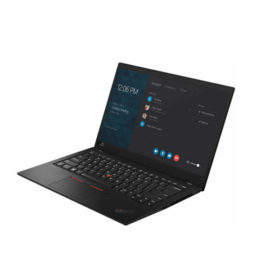
 At 6% thinner than its predecessor, the ThinkPad X1 Carbon Gen 7 is only 14.9mm thin—or just a hair more than a half inch—and it weighs only 2.4lb/1.08kg. This lightweight package reinvents portability and untethers you from the office. With a battery life of up to 18.3 hours, and Rapid Charge when you do need more juice, you can go wherever the road—or the sky—takes you*.
At 6% thinner than its predecessor, the ThinkPad X1 Carbon Gen 7 is only 14.9mm thin—or just a hair more than a half inch—and it weighs only 2.4lb/1.08kg. This lightweight package reinvents portability and untethers you from the office. With a battery life of up to 18.3 hours, and Rapid Charge when you do need more juice, you can go wherever the road—or the sky—takes you*.
At 6% thinner than its predecessor, the ThinkPad X1 Carbon Gen 7 is only 14.9mm thin—or just a hair more than a half inch—and it weighs only 2.4lb/1.08kg. This lightweight package reinvents portability and untethers you from the office. With a battery life of up to 18.3 hours, and Rapid Charge when you do need more juice, you can go wherever the road—or the sky—takes you*. 
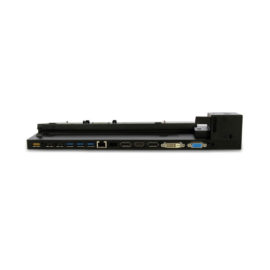
 The innovative side connector of the ThinkPad Pro Docking Station, designed exclusively for ThinkPad notebooks, provides a driver-free way to connect conveniently and securely to a range of USB accessories and external displays, while rapid charging support and a mirrored power button make it easy to disconnect and go. Designed for large enterprise environments, the ThinkPad Pro Docking Station supports PXE book, wake on LAN, and MAC address pass-through, simplifying asset management for IT managers.
The ThinkPad Ultra Docking Station provides the best docking experience for large enterprise ThinkPad customers.
The ThinkPad Ultra Docking Station provides the best docking experience for large enterprise ThinkPad customers.
The ThinkPad Thunderbolt 3 Dock (40AC) is a pioneering, 13 port docking solution powered by Intel Thunderbolt™ technology. Now, you can connect and rapidly charge like never before via a USB Type-C TM port all while experiencing complete control of your workstation and essential accessories.
The ThinkPad Thunderbolt 3 Dock (40AC) is a pioneering, 13 port docking solution powered by Intel Thunderbolt™ technology. Now, you can connect and rapidly charge like never before via a USB Type-C TM port all while experiencing complete control of your workstation and essential accessories.
Keep up to six of your most frequently-used USB devices like external storage, keyboard, mouse or optical drive plugged into the replicator so they’re ready to use at a moment’s notice. The included power cord keeps the replicator charged and ready.
Keep up to six of your most frequently-used USB devices like external storage, keyboard, mouse or optical drive plugged into the replicator so they’re ready to use at a moment’s notice. The included power cord keeps the replicator charged and ready.
The completely re-designed ThinkPad 90W Ultra Dock comes with an included ThinkPad 90W AC Adapter and grows your capability without having grown in size.
The completely re-designed ThinkPad 90W Ultra Dock comes with an included ThinkPad 90W AC Adapter and grows your capability without having grown in size.
The innovative side connector of the ThinkPad Pro Docking Station, designed exclusively for ThinkPad notebooks, provides a driver-free way to connect conveniently and securely to a range of USB accessories and external displays, while rapid charging support and a mirrored power button make it easy to disconnect and go. Designed for large enterprise environments, the ThinkPad Pro Docking Station supports PXE book, wake on LAN, and MAC address pass-through, simplifying asset management for IT managers.
The innovative side connector of the ThinkPad Pro Docking Station, designed exclusively for ThinkPad notebooks, provides a driver-free way to connect conveniently and securely to a range of USB accessories and external displays, while rapid charging support and a mirrored power button make it easy to disconnect and go. Designed for large enterprise environments, the ThinkPad Pro Docking Station supports PXE book, wake on LAN, and MAC address pass-through, simplifying asset management for IT managers.
The ThinkPad Ultra Docking Station provides the best docking experience for large enterprise ThinkPad customers.
The ThinkPad Ultra Docking Station provides the best docking experience for large enterprise ThinkPad customers.
The ThinkPad Thunderbolt 3 Dock (40AC) is a pioneering, 13 port docking solution powered by Intel Thunderbolt™ technology. Now, you can connect and rapidly charge like never before via a USB Type-C TM port all while experiencing complete control of your workstation and essential accessories.
The ThinkPad Thunderbolt 3 Dock (40AC) is a pioneering, 13 port docking solution powered by Intel Thunderbolt™ technology. Now, you can connect and rapidly charge like never before via a USB Type-C TM port all while experiencing complete control of your workstation and essential accessories.
Keep up to six of your most frequently-used USB devices like external storage, keyboard, mouse or optical drive plugged into the replicator so they’re ready to use at a moment’s notice. The included power cord keeps the replicator charged and ready.
Keep up to six of your most frequently-used USB devices like external storage, keyboard, mouse or optical drive plugged into the replicator so they’re ready to use at a moment’s notice. The included power cord keeps the replicator charged and ready.
The completely re-designed ThinkPad 90W Ultra Dock comes with an included ThinkPad 90W AC Adapter and grows your capability without having grown in size.
The completely re-designed ThinkPad 90W Ultra Dock comes with an included ThinkPad 90W AC Adapter and grows your capability without having grown in size.