Description
Hardware compatibility
Compatible with the: HP Elite x2 1012 G1, x2 1011; HP EliteBook Folio 1020, Folio 1040.


Hardware compatibility
| Hardware compatibility | Compatible with the: HP Elite x2 1012 G1, x2 1011; HP EliteBook Folio 1020, Folio 1040. |
|---|---|
| Power | 5 Volts/3 Amps |
 LENOVO D19-10 18.5” HD MONITOR, 16:09, INPUT CONNECTORS VGA,HDMI, CABLE INCLUDED VGA, TILT – 61E0KCT6UK
The Ideapad series is home to Lenovo’s budget laptops for users who may not need all the fancy features or sleek designs of flagship Ultrabooks.
The Ideapad series is home to Lenovo’s budget laptops for users who may not need all the fancy features or sleek designs of flagship Ultrabooks.
LENOVO D19-10 18.5” HD MONITOR, 16:09, INPUT CONNECTORS VGA,HDMI, CABLE INCLUDED VGA, TILT – 61E0KCT6UK
LENOVO D19-10 18.5” HD MONITOR, 16:09, INPUT CONNECTORS VGA,HDMI, CABLE INCLUDED VGA, TILT – 61E0KCT6UK
The Ideapad series is home to Lenovo’s budget laptops for users who may not need all the fancy features or sleek designs of flagship Ultrabooks.
The Ideapad series is home to Lenovo’s budget laptops for users who may not need all the fancy features or sleek designs of flagship Ultrabooks.  The newest edition to the world’s best-selling* SATA SSD series, the Samsung 860 EVO. Specially designed for mainstream PCs and laptops, with the latest V-NAND and a robust algorithm-based controller, this fast and reliable SSD comes in a wide range of compatible form factors and capacities.
The newest edition to the world’s best-selling* SATA SSD series, the Samsung 860 EVO. Specially designed for mainstream PCs and laptops, with the latest V-NAND and a robust algorithm-based controller, this fast and reliable SSD comes in a wide range of compatible form factors and capacities.
The newest edition to the world’s best-selling* SATA SSD series, the Samsung 860 EVO. Specially designed for mainstream PCs and laptops, with the latest V-NAND and a robust algorithm-based controller, this fast and reliable SSD comes in a wide range of compatible form factors and capacities.  The XPS Tower is a desktop built to grow with you. The functional design features big power and an easy-open chassis for simple expandability.
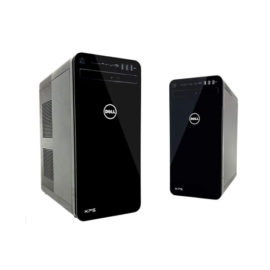
The XPS Tower is a desktop built to grow with you. The functional design features big power and an easy-open chassis for simple expandability.
The XPS Tower is a desktop built to grow with you. The functional design features big power and an easy-open chassis for simple expandability.  Connect the attached cable to a USB-C™ port, or use the included USB-C™ to USB-A adapter with legacy devices for quick access to your wired network, multiple displays, and accessories through the dock’s DisplayPort, HDMI, RJ-45, and five USB ports.
The ThinkPad USB 3.0 Ultra Dock (40A8) is an universal USB docking solution that not only delivers a premium display experience (up to 4k2k resolution via DisplayPort), but also provides quick and easy connection to all the workspace peripherals you use every day. Simply plug in a single USB 3.0 cable into your Lenovo PC for instant access to up to two external monitors, USB ports, Gigabit Ethernet, headphones/speakers, USB printers, scanners, keyboard, mouse and so on for daily use. The Dock can also charge your mobile devices via two USB always power on ports.
The ThinkPad USB 3.0 Ultra Dock (40A8) is an universal USB docking solution that not only delivers a premium display experience (up to 4k2k resolution via DisplayPort), but also provides quick and easy connection to all the workspace peripherals you use every day. Simply plug in a single USB 3.0 cable into your Lenovo PC for instant access to up to two external monitors, USB ports, Gigabit Ethernet, headphones/speakers, USB printers, scanners, keyboard, mouse and so on for daily use. The Dock can also charge your mobile devices via two USB always power on ports.
Desktop convenience with full port
Capability in a space saving design
Four USB 3.0 ports support for display port 1.2
Securing the dock and notebook with one lock
Stand and external display for more comfortable viewing
Desktop convenience with full port
Capability in a space saving design
Four USB 3.0 ports support for display port 1.2
Securing the dock and notebook with one lock
Stand and external display for more comfortable viewing
The innovative side connector of the ThinkPad Pro Docking Station, designed exclusively for ThinkPad notebooks, provides a driver-free way to connect conveniently and securely to a range of USB accessories and external displays, while rapid charging support and a mirrored power button make it easy to disconnect and go. Designed for large enterprise environments, the ThinkPad Pro Docking Station supports PXE book, wake on LAN, and MAC address pass-through, simplifying asset management for IT managers.
The innovative side connector of the ThinkPad Pro Docking Station, designed exclusively for ThinkPad notebooks, provides a driver-free way to connect conveniently and securely to a range of USB accessories and external displays, while rapid charging support and a mirrored power button make it easy to disconnect and go. Designed for large enterprise environments, the ThinkPad Pro Docking Station supports PXE book, wake on LAN, and MAC address pass-through, simplifying asset management for IT managers.
Connect the attached cable to a USB-C™ port, or use the included USB-C™ to USB-A adapter with legacy devices for quick access to your wired network, multiple displays, and accessories through the dock’s DisplayPort, HDMI, RJ-45, and five USB ports.
Connect the attached cable to a USB-C™ port, or use the included USB-C™ to USB-A adapter with legacy devices for quick access to your wired network, multiple displays, and accessories through the dock’s DisplayPort, HDMI, RJ-45, and five USB ports.
The ThinkPad USB 3.0 Ultra Dock (40A8) is an universal USB docking solution that not only delivers a premium display experience (up to 4k2k resolution via DisplayPort), but also provides quick and easy connection to all the workspace peripherals you use every day. Simply plug in a single USB 3.0 cable into your Lenovo PC for instant access to up to two external monitors, USB ports, Gigabit Ethernet, headphones/speakers, USB printers, scanners, keyboard, mouse and so on for daily use. The Dock can also charge your mobile devices via two USB always power on ports.
The ThinkPad USB 3.0 Ultra Dock (40A8) is an universal USB docking solution that not only delivers a premium display experience (up to 4k2k resolution via DisplayPort), but also provides quick and easy connection to all the workspace peripherals you use every day. Simply plug in a single USB 3.0 cable into your Lenovo PC for instant access to up to two external monitors, USB ports, Gigabit Ethernet, headphones/speakers, USB printers, scanners, keyboard, mouse and so on for daily use. The Dock can also charge your mobile devices via two USB always power on ports.
Desktop convenience with full port
Capability in a space saving design
Four USB 3.0 ports support for display port 1.2
Securing the dock and notebook with one lock
Stand and external display for more comfortable viewing
Desktop convenience with full port
Capability in a space saving design
Four USB 3.0 ports support for display port 1.2
Securing the dock and notebook with one lock
Stand and external display for more comfortable viewing
The innovative side connector of the ThinkPad Pro Docking Station, designed exclusively for ThinkPad notebooks, provides a driver-free way to connect conveniently and securely to a range of USB accessories and external displays, while rapid charging support and a mirrored power button make it easy to disconnect and go. Designed for large enterprise environments, the ThinkPad Pro Docking Station supports PXE book, wake on LAN, and MAC address pass-through, simplifying asset management for IT managers.
The innovative side connector of the ThinkPad Pro Docking Station, designed exclusively for ThinkPad notebooks, provides a driver-free way to connect conveniently and securely to a range of USB accessories and external displays, while rapid charging support and a mirrored power button make it easy to disconnect and go. Designed for large enterprise environments, the ThinkPad Pro Docking Station supports PXE book, wake on LAN, and MAC address pass-through, simplifying asset management for IT managers. 
 UNLEASH YOUR CREATIVITY WITH NEXT-GEN USB-C DOCKING