Description
Hardware compatibility
Techwings Store
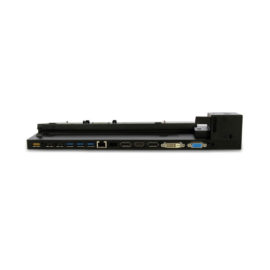
Designed exclusively for ultraslim HP EliteBook Notebook PCs, the HP UltraSlim Docking Station expands display, network, and device connectivity so you can be more productive throughout the day—all through a simple one-click slide-in side dock.
our USB 3.0 ports offer high-speed connectivity to the USB devices you use most. USB 3.0 reduces the time required for data transmission (vs. USB 2.0), is backward compatible with USB 2.0, and is bi-directional.
Get high-speed connectivity to the USB devices you use most with four USB 3.0 ports, which reduce the time required for data transmission (vs. USB 2.0), are backward compatible with USB 2.0, and bi-directional.
Secure the connected notebook to the dock with the optional HP Docking Station Cable Lock (sold separately).
Enjoy the reassurance of a one-year parts replacement limited warranty. Additional support is available (North America only) seven days a week, 24 hours a day by phone as well as through online support forums.
Hardware compatibility
| Ports | 4 USB 3.0 ports (3 USB 3.0 ports, 1 Charging port); 1 RJ-45 (network) jack; 2 DisplayPort 1.2; 1 VGA port; 1 Line-in jack; 1 Line-out jack |
|---|---|
| Hardware compatibility | HP ProBook 650 G2 Notebook PC; HP ProBook 650 G3 Notebook PC; HP Elitebook 820 G1 Notebook PC; HP Elitebook 840 G1 Notebook PC; HP Elitebook 850 G1 Notebook PC; HP EliteBook Folio 9470m Notebook PC; HP EliteBook Folio 1040 G1 Notebook PC; HP EliteBook Revolve 810 G1 Tablet; HP EliteBook Revolve 810 G2 Tablet; HP ZBook 14 Mobile Workstation |
| Power | 18.5 V |


Switch is equipped with 8-port 10/100 Mbit / s, allowing a small workgroup to easily connect to existing Ethernet networks and Fast Ethernet. This is possible thanks to the ports detect the network speed and work standards 10BASE-T and 100BASE-TX, as well as in transmission mode half / full duplex.
The definition of versatility, this ultralight 2-in-1 adapts to your business with 4 flexible modes to work, present, create, and connect. Features a stunning display with intense color and deep contrast. Even a dockable, rechargeable stylus pen. Plus, the fastest, advanced mobile broadband technology available.
Ergonomic keyboard is engineered for comfort and accuracy
Empower your business and do great things with the windows OS
Impresses with its narrow bezel and thinner, sleek appearance
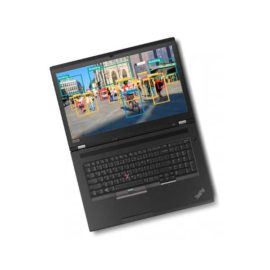
Offers superb video-conferencing, thanks to its dual-array microphone, HD webcam, 15.6-inch IPS FHD display and stereo speakers with Dolby Advanced Audio
Ergonomic keyboard is engineered for comfort and accuracy
Empower your business and do great things with the windows OS
Impresses with its narrow bezel and thinner, sleek appearance
Offers superb video-conferencing, thanks to its dual-array microphone, HD webcam, 15.6-inch IPS FHD display and stereo speakers with Dolby Advanced Audio
The completely re-designed ThinkPad 90W Ultra Dock comes with an included ThinkPad 90W AC Adapter and grows your capability without having grown in size.
The innovative side connector of the ThinkPad Pro Docking Station, designed exclusively for ThinkPad notebooks, provides a driver-free way to connect conveniently and securely to a range of USB accessories and external displays, while rapid charging support and a mirrored power button make it easy to disconnect and go. Designed for large enterprise environments, the ThinkPad Pro Docking Station supports PXE book, wake on LAN, and MAC address pass-through, simplifying asset management for IT managers.
Connect the attached USB cable to your notebook’s USB-C™ port and get display[1] and device connectivity with VGA or HDMI and two USB ports, and network connectivity from RJ-45.
Desktop convenience with full port
Capability in a space saving design
Four USB 3.0 ports support for display port 1.2
Securing the dock and notebook with one lock
Stand and external display for more comfortable viewing
Dell Express Charge allows you to charge up to 80% in one houri, making it the most efficient way to manage the workday.