Description
Hardware compatibility
Compatible with the: HP Elite x2 1012 G1, x2 1011; HP EliteBook Folio 1020, Folio 1040.

Techwings Store

Techwings Store

Techwings Store
Techwings Store
Techwings Store
Techwings Store


Hardware compatibility
| Hardware compatibility | Compatible with the: HP Elite x2 1012 G1, x2 1011; HP EliteBook Folio 1020, Folio 1040. |
|---|---|
| Power | 5 Volts/3 Amps |


 Connect the attached cable to a USB-C™ port, or use the included USB-C™ to USB-A adapter with legacy devices for quick access to your wired network, multiple displays, and accessories through the dock’s DisplayPort, HDMI, RJ-45, and five USB ports.
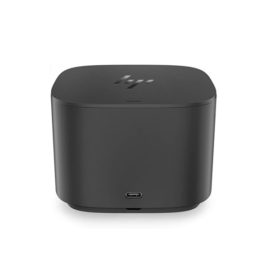
Reinvent docking and boost productivity with our most versatile Thunderbolt™ dock, the small, sophisticated HP Thunderbolt Dock G2. Designed for workspace flexibility and network manageability1, it delivers USB-C™ device connectivity and optional integrated audio
Reinvent docking and boost productivity with our most versatile Thunderbolt™ dock, the small, sophisticated HP Thunderbolt Dock G2. Designed for workspace flexibility and network manageability1, it delivers USB-C™ device connectivity and optional integrated audio
Connect the attached cable to a USB-C™ port, or use the included USB-C™ to USB-A adapter with legacy devices for quick access to your wired network, multiple displays, and accessories through the dock’s DisplayPort, HDMI, RJ-45, and five USB ports.
Connect the attached cable to a USB-C™ port, or use the included USB-C™ to USB-A adapter with legacy devices for quick access to your wired network, multiple displays, and accessories through the dock’s DisplayPort, HDMI, RJ-45, and five USB ports.
Reinvent docking and boost productivity with our most versatile Thunderbolt™ dock, the small, sophisticated HP Thunderbolt Dock G2. Designed for workspace flexibility and network manageability1, it delivers USB-C™ device connectivity and optional integrated audio
Reinvent docking and boost productivity with our most versatile Thunderbolt™ dock, the small, sophisticated HP Thunderbolt Dock G2. Designed for workspace flexibility and network manageability1, it delivers USB-C™ device connectivity and optional integrated audio  The ThinkPad USB 3.0 Ultra Dock (40A8) is an universal USB docking solution that not only delivers a premium display experience (up to 4k2k resolution via DisplayPort), but also provides quick and easy connection to all the workspace peripherals you use every day. Simply plug in a single USB 3.0 cable into your Lenovo PC for instant access to up to two external monitors, USB ports, Gigabit Ethernet, headphones/speakers, USB printers, scanners, keyboard, mouse and so on for daily use. The Dock can also charge your mobile devices via two USB always power on ports.
The ThinkPad Ultra Docking Station provides the best docking experience for large enterprise ThinkPad customers.
The ThinkPad Ultra Docking Station provides the best docking experience for large enterprise ThinkPad customers.
Connect the attached cable to a USB-C™ port, or use the included USB-C™ to USB-A adapter with legacy devices for quick access to your wired network, multiple displays, and accessories through the dock’s DisplayPort, HDMI, RJ-45, and five USB ports.
Connect the attached cable to a USB-C™ port, or use the included USB-C™ to USB-A adapter with legacy devices for quick access to your wired network, multiple displays, and accessories through the dock’s DisplayPort, HDMI, RJ-45, and five USB ports.
Transform your notebook or tablet into a complete desktop experience with the HP USB-C Universal Dock, which delivers USB-C™ charging[1] and connections for your network, dual 4K displays, and accessories with one cable connection.
Transform your notebook or tablet into a complete desktop experience with the HP USB-C Universal Dock, which delivers USB-C™ charging[1] and connections for your network, dual 4K displays, and accessories with one cable connection.
The ThinkPad USB 3.0 Ultra Dock (40A8) is an universal USB docking solution that not only delivers a premium display experience (up to 4k2k resolution via DisplayPort), but also provides quick and easy connection to all the workspace peripherals you use every day. Simply plug in a single USB 3.0 cable into your Lenovo PC for instant access to up to two external monitors, USB ports, Gigabit Ethernet, headphones/speakers, USB printers, scanners, keyboard, mouse and so on for daily use. The Dock can also charge your mobile devices via two USB always power on ports.
The ThinkPad USB 3.0 Ultra Dock (40A8) is an universal USB docking solution that not only delivers a premium display experience (up to 4k2k resolution via DisplayPort), but also provides quick and easy connection to all the workspace peripherals you use every day. Simply plug in a single USB 3.0 cable into your Lenovo PC for instant access to up to two external monitors, USB ports, Gigabit Ethernet, headphones/speakers, USB printers, scanners, keyboard, mouse and so on for daily use. The Dock can also charge your mobile devices via two USB always power on ports.
The ThinkPad Ultra Docking Station provides the best docking experience for large enterprise ThinkPad customers.
The ThinkPad Ultra Docking Station provides the best docking experience for large enterprise ThinkPad customers.
Connect the attached cable to a USB-C™ port, or use the included USB-C™ to USB-A adapter with legacy devices for quick access to your wired network, multiple displays, and accessories through the dock’s DisplayPort, HDMI, RJ-45, and five USB ports.
Connect the attached cable to a USB-C™ port, or use the included USB-C™ to USB-A adapter with legacy devices for quick access to your wired network, multiple displays, and accessories through the dock’s DisplayPort, HDMI, RJ-45, and five USB ports.
Transform your notebook or tablet into a complete desktop experience with the HP USB-C Universal Dock, which delivers USB-C™ charging[1] and connections for your network, dual 4K displays, and accessories with one cable connection.
Transform your notebook or tablet into a complete desktop experience with the HP USB-C Universal Dock, which delivers USB-C™ charging[1] and connections for your network, dual 4K displays, and accessories with one cable connection.