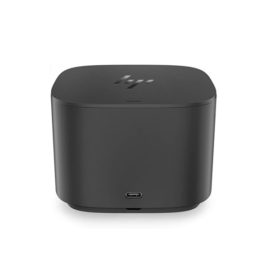
Description
Hardware compatibility
Compatible with the: HP Elite x2 1012 G1, x2 1011; HP EliteBook Folio 1020, Folio 1040.


Hardware compatibility
| Hardware compatibility | Compatible with the: HP Elite x2 1012 G1, x2 1011; HP EliteBook Folio 1020, Folio 1040. |
|---|---|
| Power | 5 Volts/3 Amps |
 150Mbps wireless data rates ideal for video streaming, online gaming and internet calling
150Mbps wireless data rates ideal for video streaming, online gaming and internet calling
150Mbps wireless data rates ideal for video streaming, online gaming and internet calling 

KEY FEATURES
Part No: STEA500400
KEY FEATURES
Part No: STEA500400
 The thin, light ThinkBook 13s laptop catches the eye with its metallic finish on an all-aluminum chassis, as well as its narrow bezel display. It’s very responsive too, with Intel® processing, Modern Standby, and a solid-state drive.
The thin, light ThinkBook 13s laptop catches the eye with its metallic finish on an all-aluminum chassis, as well as its narrow bezel display. It’s very responsive too, with Intel® processing, Modern Standby, and a solid-state drive.
The thin, light ThinkBook 13s laptop catches the eye with its metallic finish on an all-aluminum chassis, as well as its narrow bezel display. It’s very responsive too, with Intel® processing, Modern Standby, and a solid-state drive. 

KEY FEATURES
Part No: PA03710-B001
KEY FEATURES
Part No: PA03710-B001
 Reinvent docking and boost productivity with our most versatile Thunderbolt™ dock, the small, sophisticated HP Thunderbolt Dock G2. Designed for workspace flexibility and network manageability1, it delivers USB-C™ device connectivity and optional integrated audio
Keep up to six of your most frequently-used USB devices like external storage, keyboard, mouse or optical drive plugged into the replicator so they’re ready to use at a moment’s notice. The included power cord keeps the replicator charged and ready.
Keep up to six of your most frequently-used USB devices like external storage, keyboard, mouse or optical drive plugged into the replicator so they’re ready to use at a moment’s notice. The included power cord keeps the replicator charged and ready.
Transform your notebook or tablet into a complete desktop experience with the HP USB-C Universal Dock, which delivers USB-C™ charging[1] and connections for your network, dual 4K displays, and accessories with one cable connection.
Transform your notebook or tablet into a complete desktop experience with the HP USB-C Universal Dock, which delivers USB-C™ charging[1] and connections for your network, dual 4K displays, and accessories with one cable connection.
Connect the attached cable to a USB-C™ port, or use the included USB-C™ to USB-A adapter with legacy devices for quick access to your wired network, multiple displays, and accessories through the dock’s DisplayPort, HDMI, RJ-45, and five USB ports.
Connect the attached cable to a USB-C™ port, or use the included USB-C™ to USB-A adapter with legacy devices for quick access to your wired network, multiple displays, and accessories through the dock’s DisplayPort, HDMI, RJ-45, and five USB ports.
Designed exclusively for ultraslim HP EliteBook Notebook PCs, the HP UltraSlim Docking Station expands display, network, and device connectivity so you can be more productive throughout the day—all through a simple one-click slide-in side dock.
Designed exclusively for ultraslim HP EliteBook Notebook PCs, the HP UltraSlim Docking Station expands display, network, and device connectivity so you can be more productive throughout the day—all through a simple one-click slide-in side dock.
Reinvent docking and boost productivity with our most versatile Thunderbolt™ dock, the small, sophisticated HP Thunderbolt Dock G2. Designed for workspace flexibility and network manageability1, it delivers USB-C™ device connectivity and optional integrated audio
Reinvent docking and boost productivity with our most versatile Thunderbolt™ dock, the small, sophisticated HP Thunderbolt Dock G2. Designed for workspace flexibility and network manageability1, it delivers USB-C™ device connectivity and optional integrated audio
Keep up to six of your most frequently-used USB devices like external storage, keyboard, mouse or optical drive plugged into the replicator so they’re ready to use at a moment’s notice. The included power cord keeps the replicator charged and ready.
Keep up to six of your most frequently-used USB devices like external storage, keyboard, mouse or optical drive plugged into the replicator so they’re ready to use at a moment’s notice. The included power cord keeps the replicator charged and ready.
Transform your notebook or tablet into a complete desktop experience with the HP USB-C Universal Dock, which delivers USB-C™ charging[1] and connections for your network, dual 4K displays, and accessories with one cable connection.
Transform your notebook or tablet into a complete desktop experience with the HP USB-C Universal Dock, which delivers USB-C™ charging[1] and connections for your network, dual 4K displays, and accessories with one cable connection.
Connect the attached cable to a USB-C™ port, or use the included USB-C™ to USB-A adapter with legacy devices for quick access to your wired network, multiple displays, and accessories through the dock’s DisplayPort, HDMI, RJ-45, and five USB ports.
Connect the attached cable to a USB-C™ port, or use the included USB-C™ to USB-A adapter with legacy devices for quick access to your wired network, multiple displays, and accessories through the dock’s DisplayPort, HDMI, RJ-45, and five USB ports.
Designed exclusively for ultraslim HP EliteBook Notebook PCs, the HP UltraSlim Docking Station expands display, network, and device connectivity so you can be more productive throughout the day—all through a simple one-click slide-in side dock.
Designed exclusively for ultraslim HP EliteBook Notebook PCs, the HP UltraSlim Docking Station expands display, network, and device connectivity so you can be more productive throughout the day—all through a simple one-click slide-in side dock.