Description
Hardware compatibility
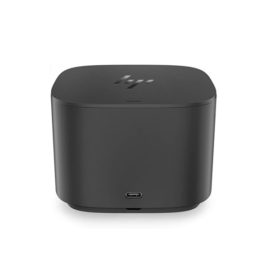
Compatible with the: HP Elite x2 1012 G1, x2 1011; HP EliteBook Folio 1020, Folio 1040.

Techwings Store
Techwings Store


Hardware compatibility
| Hardware compatibility | Compatible with the: HP Elite x2 1012 G1, x2 1011; HP EliteBook Folio 1020, Folio 1040. |
|---|---|
| Power | 5 Volts/3 Amps |
 With powerful Intel® processing and NVIDIA® Quadro® graphics, the 15.6″ ThinkPad P53 mobile workstation delivers epic performance. It features the fastest WiFi ever, is VR-Ready certified, and includes the option of a 4K OLED display with Dolby Vision™.
The ThinkCentre M720 Tiny gives most desktops a run for their money but won’t clutter your desk. Powered by Intel® 8th Gen processors with next-gen memory and storage, it’s fast, responsive, and versatile. Tiny in name but not on performance, this compact PC boasts enhanced security, reliability, and energy efficiency, too.
The ThinkCentre M720 Tiny gives most desktops a run for their money but won’t clutter your desk. Powered by Intel® 8th Gen processors with next-gen memory and storage, it’s fast, responsive, and versatile. Tiny in name but not on performance, this compact PC boasts enhanced security, reliability, and energy efficiency, too.
With powerful Intel® processing and NVIDIA® Quadro® graphics, the 15.6″ ThinkPad P53 mobile workstation delivers epic performance. It features the fastest WiFi ever, is VR-Ready certified, and includes the option of a 4K OLED display with Dolby Vision™.
With powerful Intel® processing and NVIDIA® Quadro® graphics, the 15.6″ ThinkPad P53 mobile workstation delivers epic performance. It features the fastest WiFi ever, is VR-Ready certified, and includes the option of a 4K OLED display with Dolby Vision™.
The ThinkCentre M720 Tiny gives most desktops a run for their money but won’t clutter your desk. Powered by Intel® 8th Gen processors with next-gen memory and storage, it’s fast, responsive, and versatile. Tiny in name but not on performance, this compact PC boasts enhanced security, reliability, and energy efficiency, too.
The ThinkCentre M720 Tiny gives most desktops a run for their money but won’t clutter your desk. Powered by Intel® 8th Gen processors with next-gen memory and storage, it’s fast, responsive, and versatile. Tiny in name but not on performance, this compact PC boasts enhanced security, reliability, and energy efficiency, too. 

 Designed to maximise efficiency and performance, the A4 colour multifunction printer MC363 saves time and budget. High Definition printing for professional, in-house documents is combined with duplex printing, scanning, copying and fax functions as standard.
Designed to maximise efficiency and performance, the A4 colour multifunction printer MC363 saves time and budget. High Definition printing for professional, in-house documents is combined with duplex printing, scanning, copying and fax functions as standard.
Designed to maximise efficiency and performance, the A4 colour multifunction printer MC363 saves time and budget. High Definition printing for professional, in-house documents is combined with duplex printing, scanning, copying and fax functions as standard. 

KEY FEATURES
Part No: PA03670-B051
KEY FEATURES
Part No: PA03670-B051
 Reinvent docking and boost productivity with our most versatile Thunderbolt™ dock, the small, sophisticated HP Thunderbolt Dock G2. Designed for workspace flexibility and network manageability1, it delivers USB-C™ device connectivity and optional integrated audio
Transform your notebook or tablet into a complete desktop experience with the HP USB-C Universal Dock, which delivers USB-C™ charging[1] and connections for your network, dual 4K displays, and accessories with one cable connection.
Transform your notebook or tablet into a complete desktop experience with the HP USB-C Universal Dock, which delivers USB-C™ charging[1] and connections for your network, dual 4K displays, and accessories with one cable connection.
Reinvent docking and boost productivity with our most versatile Thunderbolt™ dock, the small, sophisticated HP Thunderbolt Dock G2. Designed for workspace flexibility and network manageability1, it delivers USB-C™ device connectivity and optional integrated audio
Reinvent docking and boost productivity with our most versatile Thunderbolt™ dock, the small, sophisticated HP Thunderbolt Dock G2. Designed for workspace flexibility and network manageability1, it delivers USB-C™ device connectivity and optional integrated audio
Transform your notebook or tablet into a complete desktop experience with the HP USB-C Universal Dock, which delivers USB-C™ charging[1] and connections for your network, dual 4K displays, and accessories with one cable connection.
Transform your notebook or tablet into a complete desktop experience with the HP USB-C Universal Dock, which delivers USB-C™ charging[1] and connections for your network, dual 4K displays, and accessories with one cable connection.  Boost your PC’s power on the world’s most powerful and first modular dock with a future-ready design.
ThinkPad Docking Stations provide the best docking experience for large enterprise ThinkPad customers.
ThinkPad Docking Stations provide the best docking experience for large enterprise ThinkPad customers.
The ThinkPad Ultra Docking Station provides the best docking experience for large enterprise ThinkPad customers.
The ThinkPad Ultra Docking Station provides the best docking experience for large enterprise ThinkPad customers.
Boost your PC’s power on the world’s most powerful and first modular dock with a future-ready design.
Boost your PC’s power on the world’s most powerful and first modular dock with a future-ready design.
ThinkPad Docking Stations provide the best docking experience for large enterprise ThinkPad customers.
ThinkPad Docking Stations provide the best docking experience for large enterprise ThinkPad customers.
The ThinkPad Ultra Docking Station provides the best docking experience for large enterprise ThinkPad customers.
The ThinkPad Ultra Docking Station provides the best docking experience for large enterprise ThinkPad customers.