Description
Hardware compatibility
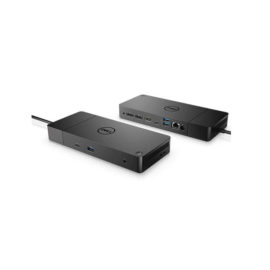
Compatible with the: HP Elite x2 1012 G1, x2 1011; HP EliteBook Folio 1020, Folio 1040.

Techwings Store

Techwings Store

Techwings Store

Techwings Store

Techwings Store

Techwings Store

Techwings Store

Techwings Store

Techwings Store

Techwings Store

Techwings Store
Techwings Store

Techwings Store

Techwings Store
Techwings Store
Techwings Store
Techwings Store
Techwings Store
Techwings Store
Techwings Store
Techwings Store
Techwings Store
Techwings Store
Techwings Store
Techwings Store
Techwings Store
Techwings Store
Techwings Store


Hardware compatibility
| Hardware compatibility | Compatible with the: HP Elite x2 1012 G1, x2 1011; HP EliteBook Folio 1020, Folio 1040. |
|---|---|
| Power | 5 Volts/3 Amps |
 The ThinkPad Ultra Docking Station provides the best docking experience for large enterprise ThinkPad customers.
The ThinkPad Ultra Docking Station provides the best docking experience for large enterprise ThinkPad customers.
The ThinkPad Ultra Docking Station provides the best docking experience for large enterprise ThinkPad customers. 


KEY FEATURES
Part No: PA03710-B001
KEY FEATURES
Part No: PA03710-B001
Powered by Windows 10 Pro and up to 10th Gen Intel® Core™ processing, the ThinkBook 15 combines high performance with intuitive, time-saving features. Built with security, reliability, and durability in mind, this 15″ business laptop enables you to work confidently anywhere.
Powered by Windows 10 Pro and up to 10th Gen Intel® Core™ processing, the ThinkBook 15 combines high performance with intuitive, time-saving features. Built with security, reliability, and durability in mind, this 15″ business laptop enables you to work confidently anywhere. 


KEY FEATURES
Part No: 9705B003
KEY FEATURES
Part No: 9705B003
 Boost your PC’s power on the world’s most powerful and first modular dock with a future-ready design.
Boost your PC’s power on the world’s most powerful and first modular dock with a future-ready design.
Boost your PC’s power on the world’s most powerful and first modular dock with a future-ready design.  Keep up to six of your most frequently-used USB devices like external storage, keyboard, mouse or optical drive plugged into the replicator so they’re ready to use at a moment’s notice. The included power cord keeps the replicator charged and ready.
Keep up to six of your most frequently-used USB devices like external storage, keyboard, mouse or optical drive plugged into the replicator so they’re ready to use at a moment’s notice. The included power cord keeps the replicator charged and ready.
Keep up to six of your most frequently-used USB devices like external storage, keyboard, mouse or optical drive plugged into the replicator so they’re ready to use at a moment’s notice. The included power cord keeps the replicator charged and ready. 
 UNLEASH YOUR CREATIVITY WITH NEXT-GEN USB-C DOCKING
The innovative side connector of the ThinkPad Pro Docking Station, designed exclusively for ThinkPad notebooks, provides a driver-free way to connect conveniently and securely to a range of USB accessories and external displays, while rapid charging support and a mirrored power button make it easy to disconnect and go. Designed for large enterprise environments, the ThinkPad Pro Docking Station supports PXE book, wake on LAN, and MAC address pass-through, simplifying asset management for IT managers.
The innovative side connector of the ThinkPad Pro Docking Station, designed exclusively for ThinkPad notebooks, provides a driver-free way to connect conveniently and securely to a range of USB accessories and external displays, while rapid charging support and a mirrored power button make it easy to disconnect and go. Designed for large enterprise environments, the ThinkPad Pro Docking Station supports PXE book, wake on LAN, and MAC address pass-through, simplifying asset management for IT managers.
Connect the attached cable to a USB-C™ port, or use the included USB-C™ to USB-A adapter with legacy devices for quick access to your wired network, multiple displays, and accessories through the dock’s DisplayPort, HDMI, RJ-45, and five USB ports.
Connect the attached cable to a USB-C™ port, or use the included USB-C™ to USB-A adapter with legacy devices for quick access to your wired network, multiple displays, and accessories through the dock’s DisplayPort, HDMI, RJ-45, and five USB ports.
UNLEASH YOUR CREATIVITY WITH NEXT-GEN USB-C DOCKING
The innovative side connector of the ThinkPad Pro Docking Station, designed exclusively for ThinkPad notebooks, provides a driver-free way to connect conveniently and securely to a range of USB accessories and external displays, while rapid charging support and a mirrored power button make it easy to disconnect and go. Designed for large enterprise environments, the ThinkPad Pro Docking Station supports PXE book, wake on LAN, and MAC address pass-through, simplifying asset management for IT managers.
The innovative side connector of the ThinkPad Pro Docking Station, designed exclusively for ThinkPad notebooks, provides a driver-free way to connect conveniently and securely to a range of USB accessories and external displays, while rapid charging support and a mirrored power button make it easy to disconnect and go. Designed for large enterprise environments, the ThinkPad Pro Docking Station supports PXE book, wake on LAN, and MAC address pass-through, simplifying asset management for IT managers.
Connect the attached cable to a USB-C™ port, or use the included USB-C™ to USB-A adapter with legacy devices for quick access to your wired network, multiple displays, and accessories through the dock’s DisplayPort, HDMI, RJ-45, and five USB ports.
Connect the attached cable to a USB-C™ port, or use the included USB-C™ to USB-A adapter with legacy devices for quick access to your wired network, multiple displays, and accessories through the dock’s DisplayPort, HDMI, RJ-45, and five USB ports.