Description
Hardware compatibility
Compatible with the: HP Elite x2 1012 G1, x2 1011; HP EliteBook Folio 1020, Folio 1040.


Hardware compatibility
| Hardware compatibility | Compatible with the: HP Elite x2 1012 G1, x2 1011; HP EliteBook Folio 1020, Folio 1040. |
|---|---|
| Power | 5 Volts/3 Amps |
 Connect the attached cable to a USB-C™ port, or use the included USB-C™ to USB-A adapter with legacy devices for quick access to your wired network, multiple displays, and accessories through the dock’s DisplayPort, HDMI, RJ-45, and five USB ports.
Connect the attached cable to a USB-C™ port, or use the included USB-C™ to USB-A adapter with legacy devices for quick access to your wired network, multiple displays, and accessories through the dock’s DisplayPort, HDMI, RJ-45, and five USB ports.
Connect the attached cable to a USB-C™ port, or use the included USB-C™ to USB-A adapter with legacy devices for quick access to your wired network, multiple displays, and accessories through the dock’s DisplayPort, HDMI, RJ-45, and five USB ports.  The Dell Optical Mouse – MS116 features optical LED tracking and wired connectivity providing a stellar performance day after day. Improve your productivity at the office or at home–the Dell Optical Mouse will help keep you on task with accurate 1000 DPI optical tracking.
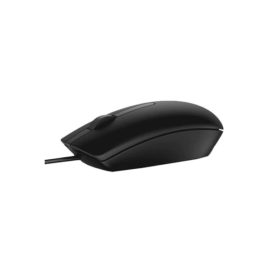
The Dell Optical Mouse – MS116 features optical LED tracking and wired connectivity providing a stellar performance day after day. Improve your productivity at the office or at home–the Dell Optical Mouse will help keep you on task with accurate 1000 DPI optical tracking.
The Dell Optical Mouse – MS116 features optical LED tracking and wired connectivity providing a stellar performance day after day. Improve your productivity at the office or at home–the Dell Optical Mouse will help keep you on task with accurate 1000 DPI optical tracking.  The ThinkCentre Lenovo All in One PC M920z saves you time and space, while making light work of tough tasks. This 23.8″ enterprise all-in-one comes with the latest Intel® Core™ processors and plenty of DDR4 memory. It’s also extremely secure and MIL-SPEC-tested. And with its easy manageability, it’s ideal for any business environment.
Connect the attached cable to a USB-C™ port, or use the included USB-C™ to USB-A adapter with legacy devices for quick access to your wired network, multiple displays, and accessories through the dock’s DisplayPort, HDMI, RJ-45, and five USB ports.
Connect the attached cable to a USB-C™ port, or use the included USB-C™ to USB-A adapter with legacy devices for quick access to your wired network, multiple displays, and accessories through the dock’s DisplayPort, HDMI, RJ-45, and five USB ports.
Keep up to six of your most frequently-used USB devices like external storage, keyboard, mouse or optical drive plugged into the replicator so they’re ready to use at a moment’s notice. The included power cord keeps the replicator charged and ready.
Keep up to six of your most frequently-used USB devices like external storage, keyboard, mouse or optical drive plugged into the replicator so they’re ready to use at a moment’s notice. The included power cord keeps the replicator charged and ready.
Desktop convenience with full port
Capability in a space saving design
Four USB 3.0 ports support for display port 1.2
Securing the dock and notebook with one lock
Stand and external display for more comfortable viewing
Desktop convenience with full port
Capability in a space saving design
Four USB 3.0 ports support for display port 1.2
Securing the dock and notebook with one lock
Stand and external display for more comfortable viewing
Transform your notebook or tablet into a complete desktop experience with the HP USB-C Universal Dock, which delivers USB-C™ charging[1] and connections for your network, dual 4K displays, and accessories with one cable connection.
Transform your notebook or tablet into a complete desktop experience with the HP USB-C Universal Dock, which delivers USB-C™ charging[1] and connections for your network, dual 4K displays, and accessories with one cable connection.
The ThinkCentre Lenovo All in One PC M920z saves you time and space, while making light work of tough tasks. This 23.8″ enterprise all-in-one comes with the latest Intel® Core™ processors and plenty of DDR4 memory. It’s also extremely secure and MIL-SPEC-tested. And with its easy manageability, it’s ideal for any business environment.
The ThinkCentre Lenovo All in One PC M920z saves you time and space, while making light work of tough tasks. This 23.8″ enterprise all-in-one comes with the latest Intel® Core™ processors and plenty of DDR4 memory. It’s also extremely secure and MIL-SPEC-tested. And with its easy manageability, it’s ideal for any business environment.
Connect the attached cable to a USB-C™ port, or use the included USB-C™ to USB-A adapter with legacy devices for quick access to your wired network, multiple displays, and accessories through the dock’s DisplayPort, HDMI, RJ-45, and five USB ports.
Connect the attached cable to a USB-C™ port, or use the included USB-C™ to USB-A adapter with legacy devices for quick access to your wired network, multiple displays, and accessories through the dock’s DisplayPort, HDMI, RJ-45, and five USB ports.
Keep up to six of your most frequently-used USB devices like external storage, keyboard, mouse or optical drive plugged into the replicator so they’re ready to use at a moment’s notice. The included power cord keeps the replicator charged and ready.
Keep up to six of your most frequently-used USB devices like external storage, keyboard, mouse or optical drive plugged into the replicator so they’re ready to use at a moment’s notice. The included power cord keeps the replicator charged and ready.
Desktop convenience with full port
Capability in a space saving design
Four USB 3.0 ports support for display port 1.2
Securing the dock and notebook with one lock
Stand and external display for more comfortable viewing
Desktop convenience with full port
Capability in a space saving design
Four USB 3.0 ports support for display port 1.2
Securing the dock and notebook with one lock
Stand and external display for more comfortable viewing
Transform your notebook or tablet into a complete desktop experience with the HP USB-C Universal Dock, which delivers USB-C™ charging[1] and connections for your network, dual 4K displays, and accessories with one cable connection.
Transform your notebook or tablet into a complete desktop experience with the HP USB-C Universal Dock, which delivers USB-C™ charging[1] and connections for your network, dual 4K displays, and accessories with one cable connection. 
 UNLEASH YOUR CREATIVITY WITH NEXT-GEN USB-C DOCKING