Description
Hardware compatibility
Techwings Store
Designed exclusively for ultraslim HP EliteBook Notebook PCs, the HP UltraSlim Docking Station expands display, network, and device connectivity so you can be more productive throughout the day—all through a simple one-click slide-in side dock.
our USB 3.0 ports offer high-speed connectivity to the USB devices you use most. USB 3.0 reduces the time required for data transmission (vs. USB 2.0), is backward compatible with USB 2.0, and is bi-directional.
Get high-speed connectivity to the USB devices you use most with four USB 3.0 ports, which reduce the time required for data transmission (vs. USB 2.0), are backward compatible with USB 2.0, and bi-directional.
Secure the connected notebook to the dock with the optional HP Docking Station Cable Lock (sold separately).
Enjoy the reassurance of a one-year parts replacement limited warranty. Additional support is available (North America only) seven days a week, 24 hours a day by phone as well as through online support forums.
Hardware compatibility
| Ports | 4 USB 3.0 ports (3 USB 3.0 ports, 1 Charging port); 1 RJ-45 (network) jack; 2 DisplayPort 1.2; 1 VGA port; 1 Line-in jack; 1 Line-out jack |
|---|---|
| Hardware compatibility | HP ProBook 650 G2 Notebook PC; HP ProBook 650 G3 Notebook PC; HP Elitebook 820 G1 Notebook PC; HP Elitebook 840 G1 Notebook PC; HP Elitebook 850 G1 Notebook PC; HP EliteBook Folio 9470m Notebook PC; HP EliteBook Folio 1040 G1 Notebook PC; HP EliteBook Revolve 810 G1 Tablet; HP EliteBook Revolve 810 G2 Tablet; HP ZBook 14 Mobile Workstation |
| Power | 18.5 V |
Live life without limits with a laptop that gets things done. With an Intel® processor, multitasking feels easy and fast.
The M7200 supports the latest generation 4G FDD/TDD-LTE networks, providing convenient carry-on Wi-Fi in most countries and regions. Now you can enjoy lag-free HD video, fast file downloads, and stable video chats regardless of where life takes.
Ergonomic keyboard is engineered for comfort and accuracy
Empower your business and do great things with the windows OS
Impresses with its narrow bezel and thinner, sleek appearance
Offers superb video-conferencing, thanks to its dual-array microphone, HD webcam, 15.6-inch IPS FHD display and stereo speakers with Dolby Advanced Audio
Ergonomic keyboard is engineered for comfort and accuracy
Empower your business and do great things with the windows OS
Impresses with its narrow bezel and thinner, sleek appearance
Offers superb video-conferencing, thanks to its dual-array microphone, HD webcam, 15.6-inch IPS FHD display and stereo speakers with Dolby Advanced Audio
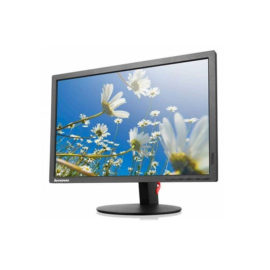
Lenovo LI2054 ColourTN | The Lenovo LI2054 Wide monitor is simple and gorgeous with its black glossy look. It is easy to use and compatible with most systems with a VGA interface. Its visual clarity is superb, with a resolution of 1440×900 and a 3M:1 dynamic contrast. It embodies the energy-saving and environmental protection mission of Lenovo with its green features, including white LED backlights and Energy-Star 6.0, CEL tier 1 and RoHS compliancy.
UNLEASH YOUR CREATIVITY WITH NEXT-GEN USB-C DOCKING
The ThinkPad Hybrid USB-C with USB-A dock expands the capabilities of most any laptop, new or old, making it perfect for enterprise customers with mixed-PC or shared-desk environments. Featuring enterprise-class manageability, like PXE boot and MAC address pass-through, the ThinkPad Hybrid USB-C with USB-A docking station offers three high-speed USB 3.1 ports and includes a USB-C to USB-A adapter to provide port replication to non-Lenovo or USB-C laptop computers.
Keep up to six of your most frequently-used USB devices like external storage, keyboard, mouse or optical drive plugged into the replicator so they’re ready to use at a moment’s notice. The included power cord keeps the replicator charged and ready.
Connect the attached cable to a USB-C™ port, or use the included USB-C™ to USB-A adapter with legacy devices for quick access to your wired network, multiple displays, and accessories through the dock’s DisplayPort, HDMI, RJ-45, and five USB ports.
The innovative side connector of the ThinkPad Pro Docking Station, designed exclusively for ThinkPad notebooks, provides a driver-free way to connect conveniently and securely to a range of USB accessories and external displays, while rapid charging support and a mirrored power button make it easy to disconnect and go. Designed for large enterprise environments, the ThinkPad Pro Docking Station supports PXE book, wake on LAN, and MAC address pass-through, simplifying asset management for IT managers.